Designed and built by professional roof inspectors. Generate fully detailed, client-ready PDF reports directly from your phone β without ever going back to the office.
Every feature has been crafted with real roofers and surveyors in mind β fast data entry, smart tools, and zero office time required.
π€
Client & Property Management
Capture full client details, property address, type and report reference in a guided form. Your company profile auto-populates every inspection you start.
Client NameAddressProperty TypeReport Ref
π€οΈ
Live Weather Integration
Automatically fetches real-time weather via GPS β temperature, wind, humidity, visibility and conditions are logged directly into every report, timestamped.
GPS Auto-FetchLive DataTimestamped
πͺ
Site Conditions & Access
Record access method, PPE status, risk assessment completion, light conditions and any access limitations β all with one-tap chip selections for speed.
Access MethodPPE ToggleRisk Assessment
ποΈ
Pitched & Flat Roof Support
Select single or mixed roof types. Add multiple independent sections for complex properties β each with its own measurements, materials and defect log.
PitchedFlatMixedMulti-Section
π
Roof Pitch Proβ’ Tool
Use your phone's accelerometer as a live digital inclinometer. Measure pitch in degrees and ratio format, then push the reading directly into the inspection form.
Live SensorDegrees & RatioCompass
π
Auto Roof Area Calculator
Enter length, width and pitch to automatically calculate the true roof surface area. The pitch factor is applied instantly β no manual maths required.
Pitch-AdjustedReal-Time CalcmΒ²
β οΈ
Defect Logging by Severity
Tap to add defects from a comprehensive pre-built list. Assign High, Medium or Low severity. Auto-generates prioritised recommendations in the final report.
High / Med / LowAuto RecommendationsPriority Order
πΈ
Integrated Photo Documentation
Capture photos in-app or upload from your gallery. Organised by roof section with labels, and embedded directly in the PDF report for full visual evidence.
Camera CaptureGallery UploadPDF Embedded
π
Professional Branded PDF Reports
Generate a fully formatted, company-branded PDF at the tap of a button. Share instantly via email or WhatsApp β before you even leave the property.
Company LogoOne-Tap ExportEmail Direct
π’
Company Profile & Branding
Set up your company name, inspector name, contact details, company reg and VAT number once. All data flows automatically into every report you produce.
Logo UploadAuto-populateProfessional
πΎ
Draft Saving & Report History
Save inspections as drafts at any stage. Your home screen shows all reports with Complete, Draft or Urgent badges β with filter and search options for quick retrieval.
Auto-saveStatus BadgesFilter
π§
Construction Detail Logging
Record underlay, battens, insulation, ventilation, flashings, fascias, soffits and guttering per roof section β a complete structural record in every report.
UnderlayFlashingsVentilationGuttering
The Inspection Flow
8 Guided Steps to a Perfect Report
Each step is structured to ensure nothing is missed β from client details through to your final PDF export.
1
Client & Property
Client name, address, property type, report date and reference number.
2
Site Conditions
Live weather, access method, PPE and risk assessment status.
3
Roof Type
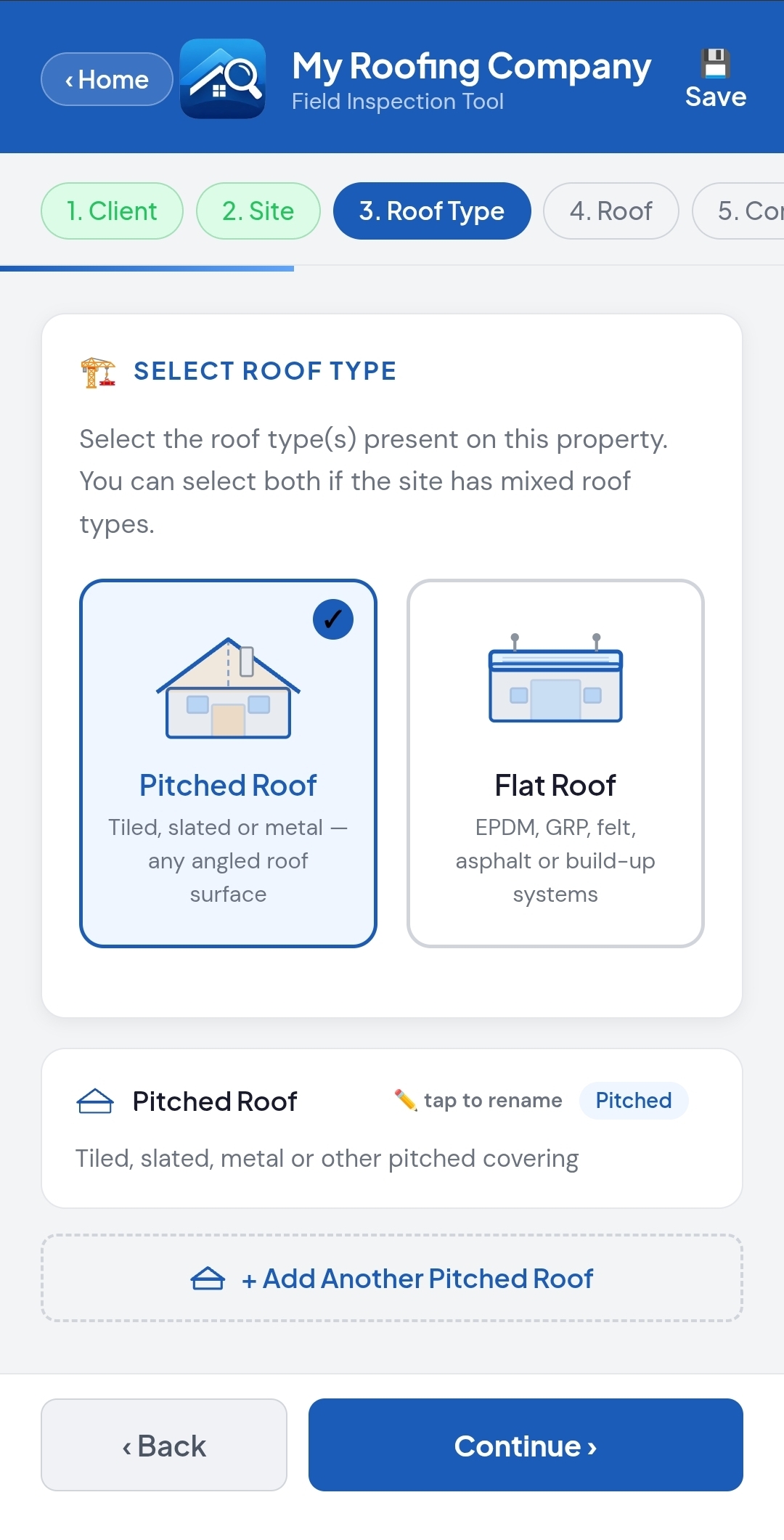
Select pitched, flat or mixed. Add multiple independent roof sections.
4
Measurements
Dimensions, pitch, auto-calculated area and covering materials.
5
Construction
Underlay, battens, insulation, flashings, guttering and ventilation.
6
Defects Found
Log defects by severity with auto-generated recommendations.
7
Photos
Capture or upload photos organised by section with labels.
8
Report & Export
Review summary stats, add comments, then export your branded PDF.
Live Intelligence
Real-Time Weather, Right on Site
When you start a new inspection, Roof Inspection Pro automatically fetches live weather data for your GPS location. Temperature, wind, humidity and visibility are captured and embedded into your report β no manual entry needed.
Auto-detects your GPS location on inspection start
Weather data timestamped and locked into the report
Demonstrates professional diligence to clients and insurers
π€οΈ
Live Weather β Portsmouth
Auto-fetched Β· GPS locked
βοΈ ConditionPartly Cloudy
π‘οΈ Temperature14Β°C
π¨ Wind Speed18 km/h SW
π§ Humidity72%
ποΈ VisibilityGood
Partly CloudyPPE βRA Complete β
Premium Feature
Roof Pitch Proβ’ β Your Phone as a Precision Inclinometer
Place your phone on the roof surface and get an instant live pitch reading using your device's built-in motion sensors. No extra equipment needed.
π
Live Degree & Ratio Readout
Displays pitch in degrees and as a rafter ratio (e.g. 6/12) simultaneously, updating in real time as you move the phone.
π§
Built-in Digital Compass
Shows roof orientation (N, NE, S etc.) using the device magnetometer β perfect for energy efficiency and shading reports.
π―
Calibration & Signal Smoothing
Zero-point calibration removes surface angle offsets. Advanced smoothing prevents jitter for steady, accurate readings.
β‘
Push Directly to Your Inspection
Tap "Use This Angle" and the pitch reading is instantly sent to the Roof Measurements step β no re-typing, no errors.
π§
22.5Β°
Pitch Angle
5/12
Ratio
MED
Class
SSW
Orientation
Who Uses It
Built for Every Roofing Professional
Whether you're a sole-trader roofer or part of a surveying firm, Roof Inspection Pro scales to your workflow.
π
Roofing Contractors
Pre-works surveys, post-installation sign-offs, and maintenance reports β impress clients with professional documentation from day one.
ποΈ
Building Surveyors
Comprehensive roof condition reports for pre-purchase surveys, party wall matters and condition schedules β structured, consistent and court-ready.
π‘οΈ
Insurance Assessors
Timestamped defect evidence with photos, weather conditions and severity classifications β exactly what underwriters and loss adjusters need.
π’
Property Managers
Systematic inspection records across a property portfolio. Demonstrate duty of care with dated, consistent reports for every building under management.
π‘
Estate Agents & Buyers
Commission a pre-purchase roof inspection and get a clear, readable report that helps buyers understand condition and negotiate confidently.
π§
Maintenance Teams
Scheduled PPM inspections with consistent records. Track deterioration over time and justify maintenance spend with photographic evidence.
Simple Pricing
One Plan. All Features. No Hidden Fees.
No per-report charges. No feature tiers. Choose the billing period that suits you and save more when you commit longer.
All plans include full access to every feature. No setup fees, no per-report charges. Cancel monthly plan anytime. Prices include VAT where applicable.
What Professionals Say
Trusted by Roofers Across the UK
β β β β β
"I used to spend an hour typing up reports back at the office. Now I send the PDF before I've even got off the roof. It's completely transformed how I work."
JM
James M.
Roofing Contractor, Manchester
β β β β β
"The Pitch Pro tool alone is worth the subscription. My protractor is gathering dust. Clients love seeing the exact pitch reading right on my phone screen."
SR
Sarah R.
Building Surveyor, Leeds
β β β β β
"As an insurance assessor I need detailed, timestamped evidence. This captures everything β weather, photos, defect severity β exactly what our loss adjusters need."
DH
David H.
Insurance Assessor, Bristol
Start Your First Inspection Today
Join hundreds of UK roof professionals who have ditched the clipboard. Roof Inspection Pro runs in your mobile browser β no download required.
A detailed walkthrough of every feature β from setting up your company profile to exporting your finished PDF report. Everything you need to carry out a professional roof inspection from your phone.
Start Here
The Complete Inspection Workflow
Roof Inspection Pro guides you through 8 structured steps. Here's exactly what each step covers and what to do.
β
Before You Begin β Set Up Your Company Profile
Tap the β Profile button in the top-right corner of the home screen. Your company profile pre-fills every report you generate automatically β set this up once and forget it.
π’
Company Name & LogoUpload your company logo β it appears on every PDF report header. Enter your trading name as you want it displayed to clients.
π€
Inspector NameYour name appears as the report author on every inspection you carry out.
π
Contact DetailsPhone number, email address and website URL β all printed in the report footer so clients can contact you directly.
π
Company Reg & VATOptional fields for company registration number and VAT number β essential for formal commercial reports.
π
Company AddressYour business address is included in the report footer alongside your contact details.
πΎ
Saving Your ProfileTap "Save Profile" to confirm. Your details are stored securely on your device and loaded into every new inspection automatically.
1
Step 1 β Client Information & Property Address
Tap "Start Inspection" from the home screen. Step 1 captures who the client is and where the property is located. This information anchors the top of your PDF report and identifies the inspection uniquely.
π€
Client NameFull name of the client or company commissioning the report. This is a required field and appears prominently in the report header.
βοΈ
Client EmailPre-fills the recipient email address when you send the finished report. Saves typing on site.
π
Report DateAuto-fills with today's date. Tap to edit if you're completing a report retrospectively or for a future inspection date.
π
Report ReferenceEnter your own reference code (e.g. RIP-001). Used for your records, invoicing and the report cover page.
ποΈ
Property AddressFull address in four fields: Address Line 1, Address Line 2, Town/City and Postcode. Appears prominently in the report header.
π
Property TypeTap to select: Detached, Semi-detached, Terraced, Flat/Apartment, Commercial or Industrial. Appears in the report property summary.
2
Step 2 β Site Conditions & Access
This step records the conditions at the time of inspection β weather, how you accessed the roof, safety measures taken and any limitations encountered. This is vital for professional liability and insurance/legal reports.
π€οΈ
Live Weather Auto-FetchThe app fetches real-time weather from your GPS location. Temperature, wind, humidity and visibility are captured automatically and saved to the report.
π
Manual Weather OverrideIf GPS is unavailable, tap the condition chips: Clear/Sunny, Partly Cloudy, Overcast, Light Rain, Heavy Rain, Windy, Frosty or Fog/Mist.
πͺ
Access MethodSelect how you accessed the roof: Extension Ladder, Scaffold Tower, Fixed Scaffolding, MEWP/Cherry Picker, Roof Walk Boards, Drone Survey or Binoculars Only.
β οΈ
Access LimitationsRecord any restrictions: Restricted Height, Neighbour Access Required, Vegetation Obstruction or Unsafe to Access β with a free-text notes field.
π¦Ί
PPE & Risk AssessmentToggle to confirm PPE worn and risk assessment completed. A third toggle logs "RA sent via email" β important for commercial and insurance work.
π
Time & Light ConditionsRecord the exact time of inspection and rate light conditions (Excellent / Good / Fair / Poor). Both are documented in the report.
3
Step 3 β Select Roof Type & Add Sections
Choose whether the property has a Pitched roof, a Flat roof, or both. For complex properties you can add multiple independent roof sections β each one is independently tracked through the remaining steps.
ποΈ
Pitched RoofSelect for tiled, slated or metal angled roofs. Activates pitched-specific material options and pitch-adjusted area calculation.
π¦
Flat RoofSelect for EPDM, GRP fiberglass, felt, mastic asphalt or liquid-applied membrane systems. Shows flat-specific material chips.
π
Mixed Roof TypesSelect both types to inspect properties with both pitched and flat sections on the same report β common on houses with flat-roof extensions.
β
Adding Multiple SectionsTap "+ Add Another Pitched Roof" or "+ Add Another Flat Roof" for complex properties. Each section is labelled (e.g. Main Roof, Garage, Extension) and tracked independently.
4
Step 4 β Roof Measurements & Covering Materials
For each roof section, enter the physical dimensions and roof covering details. The app automatically calculates the true surface area using the pitch factor for pitched sections.
π
Length, Width & PitchEnter ridge length, eaves width and pitch angle. The app applies the geometric pitch factor automatically to calculate true roof surface area in mΒ².
π
Use Pitch Pro to MeasureTap the Roof Pitch Pro button to open the inclinometer. Hold your phone on the slope, get a stable reading, then tap "Use This Angle" β the value transfers instantly.
π§±
Covering Materials (Pitched)Chips: Concrete Interlocking Tile, Clay Plain Tile, Welsh Slate, Natural Slate, Artificial Slate, Corrugated Metal, Lead Sheet, and more.
π²
Covering Materials (Flat)Chips: EPDM Rubber, Modified Bitumen Felt, Lead Sheet (Flat), Mastic Asphalt, Liquid Applied, GRP Fibreglass, and more.
π
Approximate AgeSelect from: 0β5 yrs, 5β10 yrs, 10β20 yrs, 20β30 yrs, 30β50 yrs, 50+ yrs, or Unknown. Appears in the covering section of the report.
π
Overall Condition RatingRate the covering: Excellent, Good, Fair, Poor or Critical. This drives the overall priority classification in the report summary.
5
Step 5 β Construction Details
Record the underlying construction of each roof section. This creates a comprehensive structural record for surveyors, insurers and contractors planning remedial works β going well beyond the surface covering.
πͺ΅
Underlay TypeRecord the roofing underlay type visible from the inspection β traditional felt, breathable membrane, no underlay visible, etc.
Battens & FixingsBatten type, condition and visible fixing method where accessible. Important for re-roofing cost assessments.
π‘οΈ
InsulationType, approximate depth and condition of visible insulation β critical for energy assessments, EPC surveys and party wall matters.
π¨
VentilationRidge, eaves and tile ventilation β presence, type and adequacy. Critical for condensation risk, building regulations compliance and warranty assessments.
βοΈ
FlashingsLead, mortar or proprietary flashing material, condition and any defects or deterioration at abutments, valleys and penetrations.
ποΈ
Fascias, Soffits & GutteringMaterial (timber/UPVC), condition, any defects, blockages or failure in the rainwater goods system for each section.
6
Step 6 β Defects Found
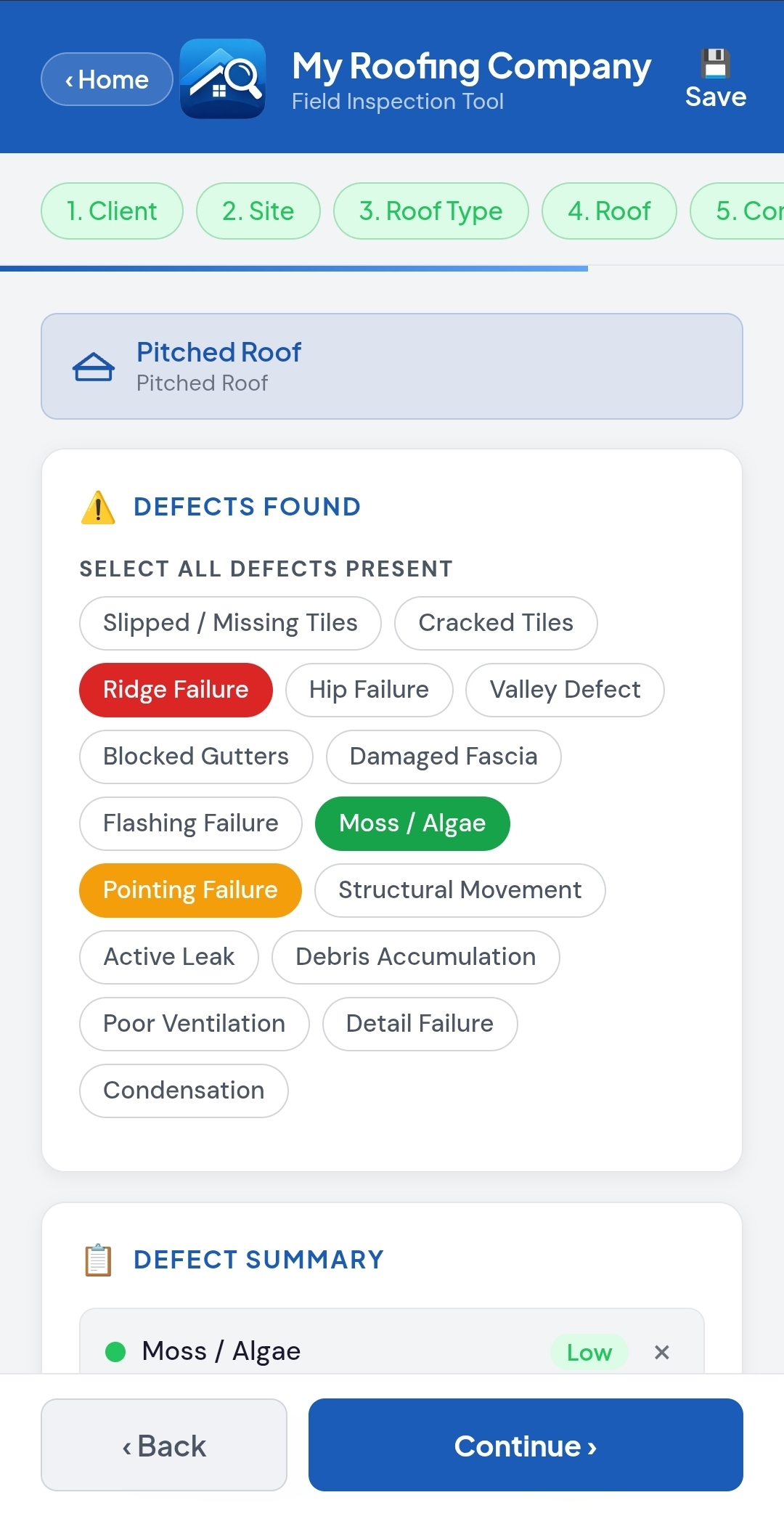
The defect logging step is the heart of every roof inspection report. Log defects by tapping from a comprehensive pre-built list β each one is severity-rated and automatically generates a prioritised recommendation.
π΄
High Severity (Immediate)Active leaks, structural failures, unsafe ridge/verge, large open sections, missing tiles over habitable space. Flagged red β action required immediately.
Low Severity (Monitor)Minor moss growth, small hairline cracks, cosmetic blemishes, early-stage weathering. Flagged green β monitor or attend at next maintenance visit.
π
Auto-Generated RecommendationsEvery logged defect automatically creates a recommendation entry with a suggested action and timeframe, printed in priority order in the report.
π
Custom Defect NotesAdd free-text description to any defect for specific details β location on the roof, extent of damage, relevant measurements.
ποΈ
Per-Section Defect LogsEach roof section maintains its own independent defect list. Switch between sections using the tabs at the top of the step.
7
Step 7 β Photo Documentation
Attach photographic evidence directly to each roof section. Photos are embedded into the PDF report with labels and organised by section β providing irrefutable visual evidence for clients and insurers.
π·
In-App Camera CaptureTap any photo slot to open your device camera directly within the app. The image is instantly saved to that inspection section.
πΌοΈ
Gallery UploadAlternatively tap the "+ Add Photo" button to upload from your phone's photo gallery β useful if you photographed the roof before opening the app.
π·οΈ
Automatic Photo LabelsEach photo slot carries a descriptive label (e.g. "Overview", "North Elevation", "Defect Close-up"). Labels appear as captions beneath photos in the PDF.
ποΈ
Remove & Replace PhotosHover or long-press a filled photo slot to reveal the β remove button. Replace photos at any time before exporting the final report.
8
Step 8 β Report Summary & Export
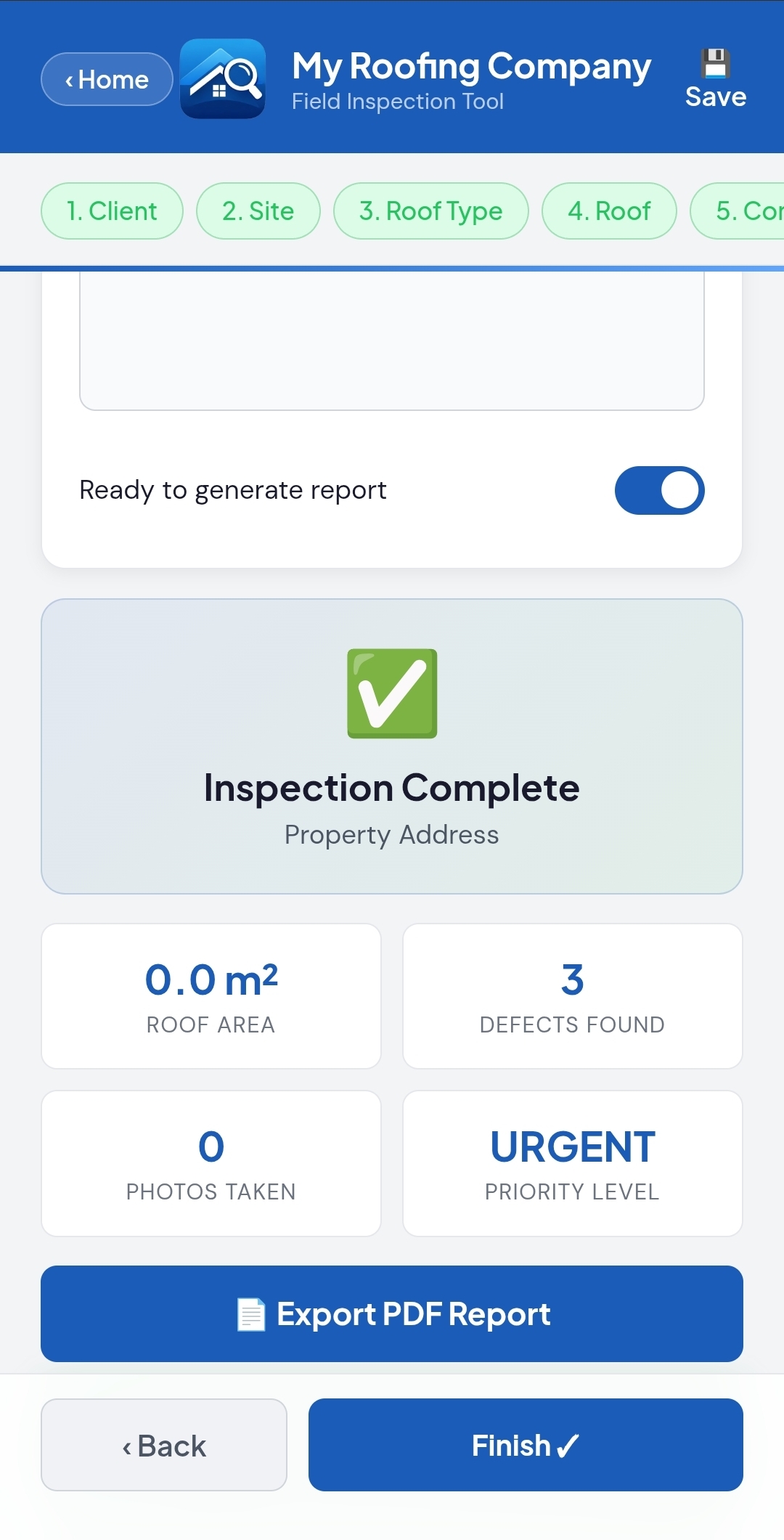
Review your complete inspection summary, add any final professional comments or caveats, toggle ready to generate, then export your fully branded PDF report with a single tap.
π
Summary StatisticsAt-a-glance totals: total roof area (mΒ²), total defects found, photos taken, and overall priority level β a quick health-check before exporting.
π¬
Additional Comments & CaveatsFree-text field with pre-written chip shortcuts: "Reasonable Condition", "Specialist Required", "Obtain Quote", "Re-inspect", "Report Limitation" and more β professional caveats in one tap.
β
Ready to Generate ToggleFlip the "Ready to generate report" toggle to activate the export button β a deliberate confirmation step so reports aren't exported accidentally mid-inspection.
π
Export PDF ReportTap "Export PDF Report" to generate your fully formatted, branded document. Your device's share sheet appears β email directly, send via WhatsApp, or save to cloud storage.
πΎ
Save as DraftNot ready to export? Tap "Save Draft" to store the inspection. It appears on your home screen with a Draft badge and can be resumed at any time.
π
Returning to the Home ScreenTap "β Home" at the top of the inspection view to exit and return to your reports list β your progress is auto-saved.
Feature Deep Dive
Mastering the Roof Pitch Proβ’ Tool
The Pitch Pro tool turns your smartphone into a professional-grade digital inclinometer and compass. Here's how to get the best results every time.
π
Using the Inclinometer
Measuring roof pitch accurately with your phone
How to Access Pitch Pro
From the home screen, tap the "π Roof Pitch Pro" button beneath the Start Inspection button. You can also open it mid-inspection from the Roof Measurements step via the dedicated shortcut button.
Sensor Permissions (iPhone)
On iOS devices, you'll be prompted to allow access to motion and orientation sensors. Tap "Allow". If denied, the tool runs in Demo Mode β animated but not reading real sensor data.
How to Take a Measurement
Place your phone flat on the roof surface with the screen facing up. Keep it still for 2β3 seconds while the signal-smoothing algorithm stabilises the reading. The degree value and ratio will settle to a steady figure β that's your pitch.
Calibration for Maximum Accuracy
If your phone is resting at a slight offset angle (e.g. on a ridge tile or uneven surface), place it on a known horizontal reference first and tap "Calibrate / Zero". All subsequent readings are offset-corrected relative to that baseline.
Pitch Classification System
Readings are automatically labelled: FLAT (under 2Β°), LOW (2β10Β°), MED (10β25Β°), STEEP (25β45Β°), XTREME (45Β°+). Classes display as bold labels on screen for instant reference.
Understanding the Ratio Display
The ratio (e.g. 5/12) shows how many inches the roof rises per 12 inches of horizontal run β standard in UK and US roofing. A 22.5Β° pitch = approximately 5/12 ratio. Both values display simultaneously so you can use whichever your client understands.
β Pushing the Reading to Your Inspection
Once you have a stable reading, tap "Use This Angle". The pitch value transfers instantly to the Roof Pitch field in Step 4 (Roof Measurements), and the roof area calculation updates automatically using the pitch factor. A confirmation toast message appears confirming the transfer. You are returned to the inspection form β no re-typing, no calculation errors.
π§
Using the Digital Compass
Roof orientation for professional reports
What the Compass Measures
The compass displays the direction your phone is pointing in cardinal directions (N, NNE, NE, ENE, E, and so on through all 16 points) and in degrees (0β360Β°). On a roof, this tells you the primary aspect of the slope.
Why Roof Orientation Matters
South-facing pitches receive maximum solar gain. North-facing slopes are prone to moss, algae and frost retention. East/West splits affect drying times and weathering rates. Orientation is important for solar panel surveys, energy efficiency reports and explaining weathering patterns to clients.
How to Read Roof Orientation
Stand at the eaves and point your phone towards the ridge (uphill). The compass will show the direction you're facing β this is the aspect of that slope. A south-facing roof will read approximately 180Β°/S when you point uphill from the eaves.
Demo Mode
If no device sensors are available (or permission is denied), Pitch Pro enters Demo Mode. The compass and inclinometer animate automatically to demonstrate the tool's function. No real measurements are taken in Demo Mode β the label "DEMO MODE" is shown clearly in the sensor status indicator.
The Output
What Your PDF Report Contains
The exported PDF is structured for clients, surveyors and insurers β professional, readable and comprehensive from cover to close.
π Report Header & Cover Details
Your company logo, company name, inspector name, full contact details and report reference β all pulled automatically from your profile. Date, client name and property address displayed prominently.
π€ Client & Property Summary
Client name, email address, full property address and property type. Report date and reference number clearly laid out β everything needed to identify the inspection uniquely.
π€οΈ Conditions at Time of Inspection
Weather summary including temperature, wind speed, humidity and visibility as recorded. Access method used, PPE confirmation, risk assessment status and light conditions β timestamped.
ποΈ Roof Type & Section Overview
A summary table of all roof sections inspected β type (pitched/flat), dimensions, calculated surface area (mΒ²), covering material, approximate age and overall condition rating per section.
π§ Construction Details Per Section
Underlay, battens, insulation, ventilation, flashing materials, fascia, soffit and guttering condition β documented independently for each roof section, providing a complete structural record.
β οΈ Defects Schedule
All defects listed with severity classification (High/Medium/Low), description and location. Colour-coded and sorted by priority level so the most critical issues are immediately visible.
πΈ Photo Evidence Pages
All captured photos embedded full-size in the report, labelled with section names and photo descriptions. Photos are attached to the correct sections for clear, unambiguous visual evidence.
β Prioritised Recommendations
Auto-generated action plan listing every recommended repair with suggested timeframe: Immediate Action, Within 3β6 Months, or Monitor Only. A clear, actionable plan the client can hand directly to their contractor.
Pro Tips
Get the Most from Every Inspection
Advice from professional roof inspectors who use the app on a daily basis.
βοΈ
Set Up Your Profile Once
Fill in your company profile completely before your first inspection. Your logo, name, contact details and company numbers auto-populate on every report β saving several minutes per job over time.
πΈ
Take an Overview Photo First
Before starting the form, walk the perimeter and capture 2β3 overview photos from ground level. These become the first images in your report and establish context for the client.
πΎ
Save Drafts Frequently
Tap the πΎ Save button in the header regularly while on site. Drafts are stored locally and can be resumed from the home screen β you'll never lose data if your phone screen locks or the browser refreshes.
π
Measure Pitch Before Entering Dimensions
Open Pitch Pro at the start of the Roof Measurements step. Take the pitch reading on the roof, tap "Use This Angle", then enter length and width. The area updates instantly with the correct pitch factor applied.
β οΈ
Log Every Defect, Even Minor Ones
Low-severity defects marked "Monitor" are just as important professionally. They demonstrate thoroughness, protect you from future liability claims, and give clients a complete picture of their roof's health.
π¬
Use the Pre-Written Comment Chips
In Step 8, use the comment chips to add professional caveats in one tap β "This report should not be relied upon as a structural survey", "A competent contractor should be engaged", "Re-inspection recommended". Essential professional protection, added in seconds.
FAQ
Frequently Asked Questions
The app works fully offline once loaded. The only feature requiring internet is the live weather auto-fetch in Step 2. If offline, simply select conditions manually using the chip buttons. Photos, measurements, Pitch Pro and all other features work without any connection.
There is no limit on the number of roof sections per inspection. Add as many pitched and flat sections as the property requires. Each section has its own independent measurements, materials, construction details, defect log and photo gallery β all consolidated into a single final report.
Pitch Pro works on any modern Android or iOS smartphone with a built-in accelerometer and magnetometer β effectively all phones made in the last 8+ years. On iPhone, grant motion sensor permission when prompted. If sensors are unavailable, the tool automatically enters Demo Mode.
Yes. Your company logo, trading name, contact details, company registration number and VAT number are all included on every report. Set these up once in the β Profile panel β they populate automatically on every new inspection without any further action.
All inspection data is stored securely in your device's local storage. Reports persist between sessions and are accessible from the home screen at any time. Use the filter chips (All, Complete, Drafts, Urgent) to quickly find specific reports. Data is held on your device β not on external servers.
Yes. After export, your device's native share sheet appears β email it directly to the client (their address pre-fills from Step 1), send via WhatsApp, save to Google Drive, iCloud or Dropbox, or print. The report is completely self-contained and ready to share immediately from the property.
No. All subscription plans include unlimited inspections and unlimited PDF report exports. There are no per-report fees, no monthly usage caps and no restrictions on how many reports you generate. Your subscription gives you full, unrestricted access to every feature.
Roof Inspection Pro is a Progressive Web App (PWA). You can use it directly in your mobile browser with no installation required by visiting roofinspectionpro.co.uk. You can also add it to your home screen for an app-like experience β tap "Share" on iOS or the install prompt on Android to pin it as a shortcut.
Ready to Carry Out Your First Inspection?
Roof Inspection Pro is a web app β no download required. Open it in your mobile browser and start your first inspection in under two minutes.